
Why Do You Need A Gaming Mouse?
A gaming mouse is more than just a peripheral, it is a precision instrument. While it shares a basic form factor with a standard desktop mouse, it is fundamentally engineered for enhanced performance. Key differentiators include higher sensitivity (DPI/CPI), additional programmable buttons, rapid response times, customizable RGB lighting, and often, adjustable weight systems. These features are not only beneficial for gaming but also significantly improve workflow efficiency for content creation and programming. So in this post we will dive into some of the best budget gaming mouse available in 2026. Not everything is budget since we try to include something for everyone, but most of them are.
Selecting the right gaming mouse can profoundly impact your overall computing experience. In fast-paced online shooters or immersive racing titles, the ability to execute complex commands instantly via thumb-operated buttons provides a tangible competitive advantage over a standard input device. However, acquiring top-tier performance does not necessitate a premium budget. This guide is dedicated to identifying the best budget gaming mice available in 2026, products that deliver exceptional performance, ergonomic design, and durable construction without placing a strain on your finances.
Beyond the in game advantages, physical comfort is paramount. An ideal mouse should feel like a natural extension of your hand, with all buttons falling comfortably under your fingers. During extended gaming sessions or long workdays, a well-designed mouse minimizes fatigue, allowing you to remain focused, relaxed, and perform at your peak. When evaluating options, we recommend looking beyond aesthetics to the following technical specifications and features.
Sensor Quality: Look for an optical sensor with a high maximum DPI (dots per inch) and, more importantly, flawless tracking without acceleration or angle snapping.
Switch Durability: Mechanical switches rated for millions of clicks ensure longevity and a satisfying tactile response.
Programmable Buttons: Consider how many additional buttons you need and whether dedicated software allows for intuitive macro assignment.
Connectivity & Polling Rate: Wired mice offer zero latency at this price point. For wireless, ensure a low-latency 2.4GHz connection. A high polling rate (e.g., 1000Hz) ensures the mouse reports its position to the PC with minimal delay.
Weight and Glide: An adjustable weight system allows for personalized tuning. Look for large, pure PTFE feet for smooth and consistent gliding.
The models listed below represent a good value in the current market. Most options are priced under $100, offering a compelling blend of professional grade features and robust performance that justifies their place in any setup.
Logitech G604- For MMO players who require vast control
The mouse has a substantial, ergonomic feel right out of the box. At first glance, the standouts are the six well defined thumb buttons on the side and the distinctive metal hyper-fast scroll wheel. The shape is noticeably right-handed, with a pronounced ridge for your ring finger, and it fills the palm comfortably. It’s not an ultralight mouse, but its weight feels solid and purposeful. The G604 is built for a palm grip. For users with medium to large hands, it provides excellent support, allowing for relaxed, fatigue free use over long sessions. As one reviewer noted, it can even be surprisingly comfortable for smaller hands, though a tighter grip might be required. The textured rubber side grips ensure it stays planted during intense moments.
The array of buttons is transformative. The six side buttons are intuitively placed and have a satisfying, tactile click, making it easy to build muscle memory for complex keybinds. Using Logitech’s G Hub software, you can create profiles for different games or applications. As a user review perfectly illustrated, you can set up one profile for World of Warcraft with ability keybinds, another for general desktop use with volume and back/forward controls, and a third for creative work with undo/redo and zoom functions.
The ability to switch profiles on the fly makes it an incredibly versatile tool. At its heart is the HERO 25K sensor. In practice, this means flawless, 1:1 tracking. There is zero discernible input lag, whether you’re using the LIGHTSPEED wireless dongle for gaming or Bluetooth for connecting to a laptop. The cursor is an extension of your intent, making it excellent for both precise aiming in shooters and pixel-precise work in design software.
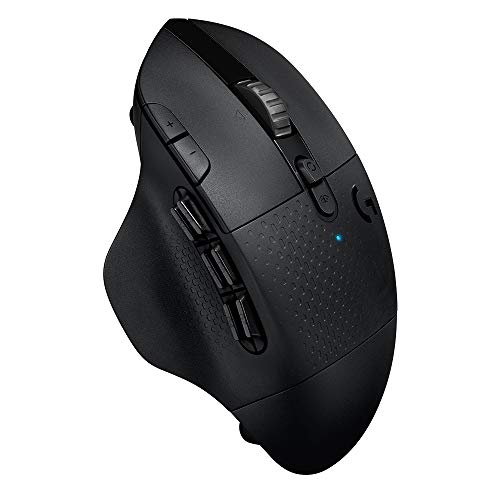
The metal wheel can be toggled between a standard, notched “ratcheting” mode for precise weapon selection, and a free-spinning “hyper-fast” mode. In hyper-fast mode, a single flick sends the wheel spinning almost indefinitely, perfect for scrolling through long web pages, code, or in-game auction houses. The efficiency of the HERO sensor is remarkable. Logitech claims up to 240 hours of gaming on a single AA battery in LIGHTSPEED mode, and up to 5 months in Bluetooth. This eliminates the anxiety of a dying mouse mid game and makes the single AA battery a feature, not a drawback.
The cover is held in place by a magnet. While generally secure, one reviewer noted that fidgeting with it over time can weaken the hold, potentially causing it to pop loose during use. It’s not designed for “flick” gaming where ultralight weight is the primary goal. However, its weight contributes to a sense of stability. For optimal glide, pairing it with a quality hard mouse pad is recommended by users to ensure consistent tracking and preserve the mouse feet.
The Logitech G604 is a masterclass in a specialized tool. It’s not trying to be the lightest or the flashiest mouse on the market. Instead, it excels at being a supremely comfortable, precise, and highly customizable control hub for gamers and power users who crave functionality. This is for you if you play MMOs, MOBAs, or any game where having a multitude of instant commands is a competitive advantage. Its value also extends to content creators and programmers who can harness the programmable buttons to streamline their workflow.
- 15 programmable controls and dual connectivity
- Hero 25K sensor
- Dual mode hyperfast scroll wheel
Razer Basilisk V3 Pro-Ergonomics, customization, and wireless performance
- 13 customizable scrolls
- Configurable hyperscroll tilt wheel
- 35K optical sensor and 13 zone chroma lighting
The Razer Basilisk V3 Pro 35K also presents itself as the definitive, no-compromises flagship for gamers who demand the absolute best in ergonomics, customization, and wireless performance. It’s a mouse that doesn’t just compete, it sets a new benchmark for what a premium wireless peripheral can be. The mouse has a substantial, purposeful weight that immediately signals its premium build quality. The right-handed ergonomic design is immediately apparent, featuring a pronounced thumb rest and a contour that perfectly cradles the hand. The standout physical feature is undoubtedly the HyperScroll Tilt Wheel, a solid metal wheel with a unique, textured finish.
This mouse is a dream for palm-grip users, especially those with medium to large hands. The thumb rest provides a natural, relaxed position that reduces finger drag on the mouse pad. The shape fills the hand perfectly, providing support that makes long gaming sessions or workdays genuinely fatigue-free. The scroll wheel is an engineering marvel. It offers three distinct modes, configurable in Razer Synapse. Tactile Mode for a standard, notched feel for precise weapon selection or ability scrolling. Free-Spin Mode for perfect for flying through long documents or code. Smart-Reel Mode is the killer feature. The wheel intelligently switches between tactile and free-spin modes based on your scrolling speed, slow for tactical, fast for free-spin.

The new Razer Focus Pro 35K Optical Sensor Gen-2 is, for all intents and purposes, flawless. Tracking is perfect on a wide variety of surfaces, including glass. The 1-DPI step adjustment allows for hyper-fine tuning of sensitivity. While in game, this translates to absolute precision, with zero smoothing or acceleration. The Razer Optical Mouse Switches Gen-3 are crisp, instant (0.2ms actuation), and satisfying, with a long 90-million click lifecycle that eliminates any worry about double-clicking issues. Razer Synapse is the command center. You can remap all 13 buttons, create complex macros, and customize the 13-zone Chroma RGB lighting extensively. For a mouse at this price point, it’s a notable omission that the Razer Mouse Dock Pro or wireless charging puck are sold separately. Using the dock transforms the experience, making charging effortless, but it’s an added cost to factor in.
It is not an ultralight mouse. Its weight contributes to its stable, controlled feel, but players who prefer very lightweight mice for fast-flicking in competitive shooters may find it slightly heavy. While powerful, Synapse can be complex for new users. It takes some time to explore and configure all the available settings, but the effort is well worth it for the level of control you gain. Choose the Basilisk V3 Pro 35K if you prioritize ergonomic comfort above all else and have a palm grip. You want the most advanced scroll wheel on the market with its intelligent modes and tilt functions. You demand top-tier wireless performance, a state-of-the-art sensor, and extensive customization for both gaming and productivity.
Razer DeathAdder Elite-Budget palm grip
- 16,000 DPI Optical Sensor
- Customizable Chroma RGB Lighting
- 7 Programmable Buttons
- Ridged, Rubberized Scroll Wheel & mechanical switches supporting up to 50 million clicks
We are getting into the budget, less dramatic options now. The DeathAdder elite represents a masterclass in focused design. Perfecting an iconic ergonomic shape and delivering flawless, high-performance essentials without unnecessary gimmicks. The first thing that strikes you is the mouse’s lightweight feel, even as a wired peripheral. The box itself is feather light, and the mouse follows suit. It’s immediately apparent that this is a large mouse with a pronounced arch, designed to fill a palm.
The matte black finish and understated Razer logo are clean and professional. The cord is notably light and supple, a welcome change from the thick, braided cables that can add drag. The DeathAdder Elite is the benchmark for a palm grip mouse, particularly for users with medium to large hands. Its shape is its killer feature. As one reviewer put it, the feeling is so good you might find yourself “mousing around for no reason but the pleasure of it.” The pronounced hump supports the palm perfectly, while the lightly textured sides provide a secure grip. The two main buttons feature a subtle, comfortable finger groove. This is a mouse designed for hours of fatigue-free use.
At its heart is the 16K DPI optical sensor, which in practice delivers flawless, 1:1 tracking with 99.4% resolution accuracy. The dedicated DPI buttons on the top (behind the scroll wheel) allow for on-the-fly sensitivity adjustments. A key insight from a user is the importance of calibration, while many gamers disable acceleration entirely, some prefer a slight touch. The Razer Synapse software allows for fine-tuning, with one user finding their sweet spot at 1800 DPI with acceleration set to “2” out of 10, achieving a “zippy and responsive” feel that their previous heavier mouse couldn’t match. The ridged rubber scroll wheel offers precise, tactile feedback with a good amount of resistance, giving you confident control for weapon switching or volume adjustment.

You can remap all 7 programmable buttons, assign complex macros, and customize the Chroma RGB lighting using the synapse software. You can choose from 16.8 million colors and various effects, from a subtle static glow to immersive lighting that reacts to in-game events. One user noted they keep their DeathAdder set to a dim green static glow, finding it less aggressive than other mice’s lighting.
User reviews speak volumes about its longevity. One user reported using their DeathAdder Elite for almost 6 years with no major issues, noting that the main maintenance tasks are occasional cleaning of the rubber side grips and the braided cord. A practical tip from a long-term owner, use rubbing alcohol on a microfiber cloth or a durable paper towel to easily clean accumulated finger oils from the rubber grips. The only consistent pain point mentioned is the Synapse software. One long-term user experienced periods where profile saving became buggy or the software crashed.
The Razer DeathAdder Elite is not about flashy new features. It’s about perfecting a proven formula. It takes one of the most beloved ergonomic shapes in gaming history and equips it with a top-tier sensor and durable, satisfying switches. If your priority is unmatched ergonomic comfort for palm-grip users with medium to large hands. You want a straightforward, high-performance wired mouse with a world-class sensor and just enough customization (buttons, RGB) to make it your own, without unnecessary complexity. It’s a superb value for its price. Look elsewhere if you have small hands, prefer a lightweight or ambidextrous mouse for claw/fingertip grip, are committed to a wireless setup, or want a mouse with a high number of side buttons (like an MMO mouse).
SteelSeries Sensei-Old school claw grip
- Programmable macro buttons
- Three zonelighting
- SteelSeries ExactSens, FreeMove, ExactAim, and ExactLift
The SteelSeries Sensei is a mouse that commands respect in the gaming community and we just can’t leave it out. Released in an era before ultra-lightweight designs and wireless dominance, it carved its legend through a different philosophy, perfect ambidextrous shape, uncompromising build quality, and a “no-nonsense” approach to performance. Using it today offers a fascinating glimpse into what made a tournament-grade classic. The finish is a smooth, slightly glossy grey (in this model) that feels clean and durable. The braided cable is thick and robust, built to last. The weight distribution is immediately noticeable. It feels balanced and planted, not heavy in a cumbersome way, but solid.
The Sensei is a masterclass in symmetrical design. It’s not a small mouse, but its medium-large size and the way it tapers make it exceptionally versatile for different grip styles. It’s particularly well-suited for claw and fingertip grips, allowing for agile, precise movements. A long-time competitive Quake player, in their review, called it the worthy successor to the legendary Microsoft Intellimouse Explorer, praising its perfect ambidextrous shape and weight distribution. At its heart is a laser sensor.
While optical sensors are now the standard for gaming, this laser implementation is highly capable. The user-defined CPI (counts per inch) settings allow for on-the-fly sensitivity adjustment via the buttons on top, with an indicator light showing your current setting. The core philosophy here is purity of input. As one reviewer passionately noted, this mouse (especially the “RAW” version) strips away all gimmicky software-based modifications like prediction or acceleration. The belief is simple, if you need a straighter line, you should practice more, not let software correct your input.

The main buttons feature a crisp, satisfying tactile click with a very short actuation distance. They feel durable and responsive. The 7 programmable buttons are well-positioned, though the side buttons on both sides mean you’ll need to be mindful of your grip to avoid accidental presses if you’re not using one side. You can store different profiles, macros, and sensitivity settings directly on the mouse’s memory.
This is a huge boon for competitive players who travel to LAN events, allowing them to plug into any PC and have their exact settings ready to go, without needing to install drivers or software. The SteelSeries Sensei is more than just a mouse;, it’s a piece of gaming history. It represents a time when the focus was on perfecting the fundamental shape and providing a pure, unadulterated connection to the game. For those who used it, it set a standard for ambidextrous design and on-the-fly customization that few have matched.
Corsair NIGHTSWORD-For tinkerers
- 18K optical sensor
- 10 programmable buttons
- Smart Tunable Weight System
What if you could tune your mouse’s weight and balance as precisely as you tune your gaming PC? It’s clear this is a device for the tinkerer, the player who believes that the perfect feel is the foundation of perfect performance. The mouse has a substantial, purposeful presence. Its contoured, right-handed shape immediately signals its ergonomic intent. The most intriguing part of the unboxing is the included weight kit. Two sets of small metal weights and a diagram showing six possible mounting locations inside the mouse. The NIGHTSWORD is designed for palm and claw grips, with a pronounced shape that fills the hand. The high performance rubber grips on the sides, inspired by professional sports equipment, provide a secure, non-slip hold even during intense sessions. It’s a comfortable mouse for long hours, though its size and shape are decidedly for medium-to-large hands.
Using the included weights and the iCUE software, you can adjust the total weight between 119g and 141g and, more importantly, fine-tune the mouse’s center of gravity. You can make it front-heavy for more controlled, deliberate flicks, or back-heavy for faster, more agile movements. The software even detects the center of gravity in real-time, guiding you as you experiment. With 120 possible configurations, you can genuinely dial in a feel that matches your grip and game style perfectly. As one user noted, it makes the mouse feel like a true extension of your arm. The 10 fully programmable buttons, featuring Omron switches rated for 50 million clicks, offer crisp, tactile feedback. The dedicated “sniper” button on the side, which temporarily lowers DPI for precision aiming, is a welcome feature for FPS players.
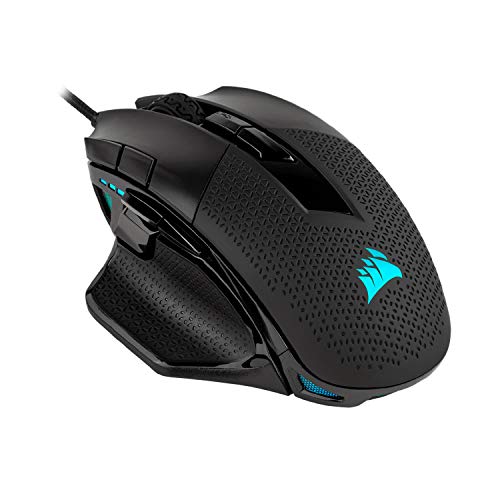
A recurring theme in user reviews is the longevity of the middle mouse button or the scroll wheel click. Multiple long term users (2-3 years of heavy use) report that the middle click can begin to double-click or fail entirely over time. One user described it as a potential design issue where the scroll wheel doesn’t provide enough actuation travel to reliably press the switch.
A few users mention that the additional DPI adjustment buttons located just forward of the left mouse button can be accidentally pressed during gameplay, causing an unexpected sensitivity shift. Choose the NIGHTSWORD if you are a tinkerer who loves to fine-tune every aspect of your setup. You want the ability to adjust not just your mouse’s sensitivity, but its very weight and balance to match your grip and game. It’s a strong choice for FPS and MOBA players who believe that physical comfort and feel are paramount. The high-precision sensor and robust build quality back up its unique features.
Logitech G502 X-The lightweight classic
- HERO 25K gaming sensor
- Redesigned hyperfast scroll wheel
- LIGHTFORCE switches
The Logitech G502 X is not just another gaming mouse or merely an upgrade from the popular G502 design, it’s a calculated evolution of a legend. It takes the iconic, beloved shape of the G502 and rigorously refines it for the modern era, stripping away weight and introducing groundbreaking switch technology. The first thing you notice is the weight, or rather, the lack of it. At just 89 grams, it feels dramatically lighter than its predecessor, the classic G502. This immediately signals a shift in philosophy: maintaining the beloved shape but making it faster and more agile. The matte black finish is clean and understated.
The shape is instantly familiar to anyone who has used a G502. It’s a right handed design with a comfortable thumb rest and a contour that supports a palm or claw grip. It’s particularly well-suited for medium-to-large hands. The lightly textured surface provides a secure hold. As one long-time user noted, if you enjoyed the G502 Hero, “the G502 X here will fit perfectly in your hand, and you will fall in love with it.” It’s a shape that has been refined over years, and it shows.
The primary left and right buttons use Logitech’s new hybrid optical-mechanical switches. They offer the crisp, tactile click and satisfying feel of a mechanical switch, combined with the speed and reliability of optical actuation. The result is instant, responsive clicks with zero debounce delay, and they are rated for incredibly long life. Some users have noted the click has a slightly more pronounced, metallic sound compared to quieter switches, but this tactile and audible feedback is part of its charm for many. The DPI clutch button near the thumb rest is now reversible, allowing you to position it for maximum comfort and easy access. The signature metal scroll wheel returns, allowing you to switch between a tactile, notched mode for precise actions and a free-spinning mode for flying through long documents.

The 89-gram weight is a game changer. It makes flick shots and rapid movements feel effortless, addressing the primary criticism of the original G502’s heft. As a competitive FPS player noted, while it may not be the absolute first choice for ultra-competitive shooters (where sub-60g mice dominate), for everything else, it’s “easily my favorite mouse ever.” The Logitech G502 X is a masterclass in how to update a classic.
It takes everything people loved about the G502, its iconic shape, versatile buttons, and legendary scroll wheel. And makes it significantly better by shedding weight and introducing innovative LIGHTFORCE switches. This is for you if you are a fan of the G502 shape or are looking for a versatile, high-performance wired mouse for a wide range of games (from MMOs to shooters). You value having ample, well placed programmable buttons and a scroll wheel that can do it all. The weight reduction makes it more agile than ever.
Logitech G305-Lightest of weights
- 12K DPI sensor and 400 IPS precision
- Awesome battery life
- Weighs only 3.4 oz
This mouse has become a community phenomenon. It’s the mouse that seasoned gamers recommend to friends on a budget, the one that consistently tops “best value” lists, and the one that proves you don’t need to spend a fortune for elite wireless performance. The G305 is deceptively simple. It’s a compact, symmetrical mouse that feels light in the hand at just 99 grams. The build quality is immediately reassuring, solid, with no creaking or flex. The matte finish feels durable and provides a clean, understated look. Included in the box is a single AA battery and the tiny LIGHTSPEED wireless USB dongle. The first surprise is the clever design. The mouse’s top cover slides off magnetically, revealing a compartment that neatly stores the battery and has a dedicated slot to hold the dongle for travel.
The G305 features a versatile, symmetrical design that comfortably accommodates a variety of grip styles, particularly claw and fingertip grips. It’s compact, but not so small that it feels cramped for medium-sized hands. As one user noted, it strikes a perfect balance, being “light enough for quick flicks in FPS games, but not so light that it feels cheap.” Logitech’s LIGHTSPEED wireless technology delivers a 1ms report rate that is, for all practical purposes, indistinguishable from a wired connection.
There is zero perceptible lag, no dropouts. Just pure, responsive control. As a reviewer put it, “It genuinely feels as responsive as my wired mouse, which I wasn’t expecting.” The G305 runs on a single AA battery. Logitech’s claim of up to 250 hours of continuous gaming is not marketing hype, it’s a real-world reality. Users report getting months of heavy use out of a single battery. One user even noted that a single Duracell AA lasted them close to 4-6 months.

With 6 programmable buttons, the G305 offers essential customization without overwhelming complexity. Using Logitech’s G HUB software, you can remap buttons, set DPI levels, and create custom macros. The most common minor critique is that the scroll wheel feels a bit basic. It’s functional and precise but lacks the tactile sophistication or hyper-fast modes of more expensive Logitech mice (like the G502 series). For few, the need to use a disposable (or rechargeable) AA battery might feel like a step backward.
While the shape is symmetrical, the side buttons are only on the left side, making it a right-hand-only mouse for those who want to use the extra buttons. The Logitech G305 is more than just a great budget mouse. It’s a testament to what happens when a company nails the fundamentals. It delivers a flawless wireless experience, a top-tier sensor, exceptional battery life, and a comfortable, durable design, all at a price that is simply astonishing.
HyperX Pulsefire Surge
- Dynamic 360 degree RGB effects.
- Pixart 3389 sensor with native DPI up to 16, 000.
- 50 million clicks.
The HyperX Pulsefire Surge is a mouse that makes a statement before you even click a button. It’s a wired gaming mouse that boldly prioritizes stunning aesthetics and exceptional build quality as its primary calling card, while backing it up with a proven, high-performance sensor. The first thing that captures your attention is the mouse’s unique design. It features a 360-degree RGB Light Ring that wraps seamlessly around the primary buttons and the entire base of the mouse. It’s not just a logo or a scroll wheel, the light is the centerpiece. The matte black finish is clean and understated, providing the perfect canvas for the vibrant lighting effects. The mouse feels solid and well-constructed, with a weight that feels substantial but not heavy (100g).
The Pulsefire Surge features a symmetrical, right-handed design with a comfortable contour that suits a variety of grip styles, particularly claw and fingertip grips. It’s a medium-sized mouse, and the shape is inoffensive and functional, it simply fits well without forcing your hand into any extreme position. The large skates on the bottom provide an exceptionally smooth, controlled glide on both cloth and hard surfaces. As one user with larger hands noted, it’s “just large enough to be comfy without being too small,” with a nice contour that works well. The light ring delivers some of the most vibrant, smooth, and dynamic RGB effects available on any mouse. Using the HyperX NGenuity software, you can customize each individual LED with a vast spectrum of colors and effects.

Under the hood, the Surge is powered by the legendary Pixart PMW3389 optical sensor, a favorite among enthusiasts for its flawless, raw performance. With native DPI up to 16,000 and a 1000Hz polling rate, tracking is absolutely precise and responsive. With 6 programmable buttons, the Surge offers essential customization. You can remap buttons, set DPI stages, and create macros using the NGenuity software. The onboard memory allows you to save up to 3 profiles directly to the mouse, meaning your custom settings, including your lighting effects are always with you, even if you plug into a different PC without the software installed.
While many users report the mouse holding up perfectly for years, there is a notable and recurring theme in reviews regarding long-term durability, particularly with the scroll wheel and primary clicks. Several users mention the mouse developing issues after 4-8 months of use, such as the scroll wheel becoming erratic or double-clicking, or the mouse simply ceasing to function.
The HyperX Pulsefire Surge is a beautiful paradox. It pairs an absolutely top-tier, no-nonsense sensor with a visually spectacular RGB implementation. For many users, it has proven to be a dependable and fantastic-looking companion for years. Its in-hand feel, smooth glide, and crisp clicks make it a joy to use for both gaming and daily work.
So these are our top recommendations when it comes to choosing a wired/wireless gaming mouse in 2026. What are you gonna stick with that suits your grip, gaming taste, budget, ideal dimensions? Corsair? Logitech? Or you’ve got a completely different option in mind? Let us know your choice in the comments below!
About the Author


Cheers and I really appreciate the motivation. I read your blog post about the keyboard and I already said it’s really great..However I didn’t see a comment section on your site for me to leave a thumbs up?
I shudder to think what those mice are going to look like in a few years time, I have a Logitech G502 and dirt already gets caught in the rubber grip patterns what’s it going to be like on these mice?
It is an issue. However with proper maintenance, specially with the large claw grips and more programmable buttons you can overcome this issue.
Cheers and I really appreciate the motivation. I read your blog post about the RAZER DEATHADDER V2 and I already said it’s really great best gaming beasts. However I didn’t see a comment section on your site for me to leave a thumbs up?
Thank you! there is a comment section though